Making a Rollable Random Table Spreadsheet
I love random tables - I like the way they can get me started on something that I'm feeling some "blank page" inertia about, the way they help me get out of a rut or prompt me to think about things from a different angle, and how they support the "chocolate plus peanut butter" fun of combining a few disparate ideas. This has caused me to be an inveterate random table hoarder; my biggest Feedly board for saved blog posts is by far my list of great random tables (it looks like some of my top blog sources are: d4 Caltrops, Elfmaids & Octopi and OSRVault). However, at a certain point I noticed that while I had collected a large number of really cool and inspirational random tables, I wasn't necessarily using them very much. I think there were a few main problems: First, while I am prepping for a session, I'm usually trying to get in a flow - and breaking away to go dig out a book, pdf or blog post that might have a useful table is just too much mental friction. Additionally, because I never got into a good habit of using them, I would often forget about some really good tables I had found. Finally, the multiple tables I might have on a given topic were spread across a number of different sources - making it very difficult to use them together.
In order to make my random tables more usable during prep and at the table, I decided to compile a bunch of the ones that seemed most useful into a spreadsheet that can automatically roll on all the tables and compile the results into sheets that are grouped by topic. For example, here is part of my summary sheet for making an NPC:
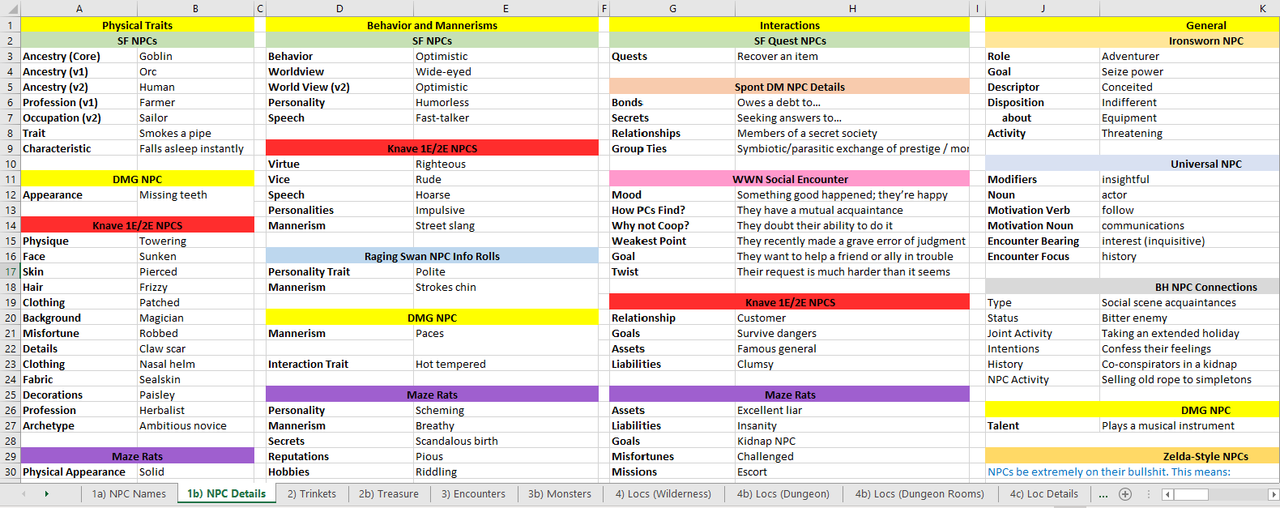 What I have found useful about this is that it is very "glanceable" - I can look over a lot of different options until something catches my eye. If nothing does, I can just have everything re-roll. There are lots of ways to do this; some of my friends have made random generators with Perchance, or with Obsidian plugins. I am comfortable with Excel, so that is what I went with.
Making a Roll Table Spreadsheet
Demo Spreadsheet
I have shared my approach to making a spreadsheet like this on the SF Discord a few times, and people found it useful - so I thought I would share it here as well. My big spreadsheet has a ton of tables that are not open content, so I have made a demo spreadsheet with only a handful of tables from Sly Flourish's Lazy GM Resource Document and from the Cairn SRD that are in the Creative Commons. I will use this demo spreadsheet for all the examples below.
Google Drive download [depending on your browser may open in Google Sheets]
Google Sheets version. [set to View Only, make your own copy for the rolling function to work]
Key Commands
I use two commands to make the spreadsheet work: RandBetween and VLookup. Excel has a lot of different ways to go look up information from elsewhere in the spreadsheet, but VLookup is pretty straightforward, so that is what I use.
RANDBETWEEN( minimum, maximum ): RandBetween does what the name says - it will randomly generate an integer between a minimum and a maximum. This is how we simulate a random die roll: e.g. RANDBETWEEN(1,6) would give you a d6, while RANDBETWEEN(1,20) would give you a d20. You can adjust the maximum to handle a table with any number of entries. You can also combine the results with all the usual math operations. For example, RANDBETWEEN(1,6)+RANDBETWEEN(1,6) would give you a 2d6 result.
VLOOKUP( thing to go look for, table to go look it up in, column of the table to pull the result from ): VLookup is how we get a result from the table. Basically: you point it at a table, give it something to look for, tell it to go find the first row with that thing, and then bring back the contents of a given column in that row. We've got random tables where the first column has numbers counting up from 1, so the "think to look for" is just the result of our random roll. (Zee Bashew has a nice video showing how to use Vlookup for making things like character sheets).
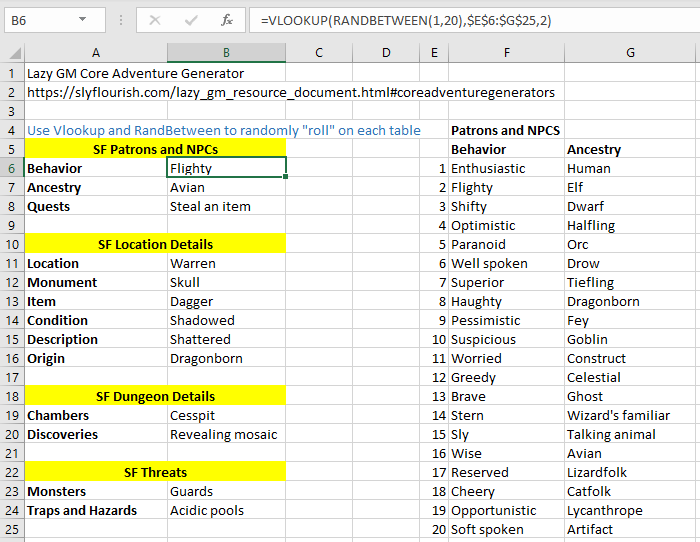
Let's take a look at how to put this together. Here is an example from the SF Core Generators sheet from the demo spreadsheet. We want the results from the NPC Behavior table, which is the second column of the table in cells E6 to G25. This is a d20 table, so our first input to the VLookup command is RANDBETWEEN(1,20) to get a random row. The second input is a reference to the table to pull from $EG signs make this an absolute reference - that way if we copy the Vlookup command to another location it won't try to adjust the table reference, it will always point to here. This is helpful when you have a big multi-column table; you can set up the formula once, copy it a bunch of times and then adjust the column input. The third input is the column we want, which in this case is 2 for the Behavior column. For the Ancestry result in the next cell down we do the exact same thing, but make the third input a 3.
Making a Summary Sheet
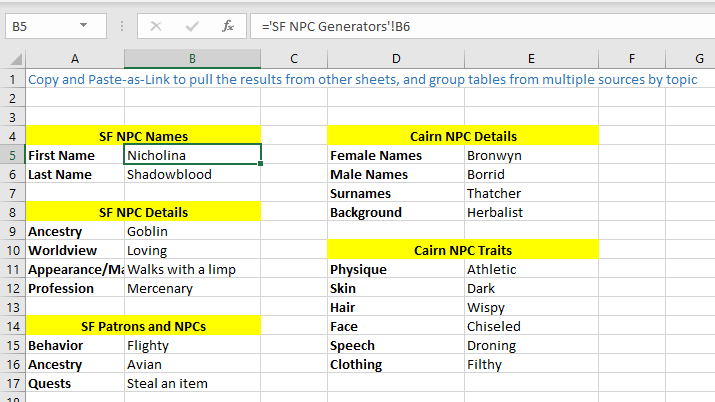
The last thing we want to do is pull all the results on a given topic to a summary sheet. In the demo, we have two sources of results for NPCs - the Sly Flourish tables and the Cairn tables. I want them all grouped together, so that when I'm making an NPC I have everything all in one place. To do that, we're going to have our summary page have links to the cells on the other sheets with the VLookup commands that do the rolling. Here is an example from the NPC summary sheet. It tells Excel to go to the SF NPC Generators sheet and go grab whatever result is in cell B6. The advantage of using a link like this is that whenever the source updates, the summary sheet will also update. You can type out the link references, but I always just copy the source cells and then use "Paste Link" to put them onto the summary page.
Making Your Own Spreadsheet
Making your own spreadsheet is just using these tools over and over:
- Copy or type in your tables: this is what takes the longest time. Many PDFs aren't structured to make copying tables easier. Sometimes it is best to copy it into Notepad and do some adjustments to the text before copying into Excel. It may paste cleanly, or you may need to use the Text Import Wizard and then either split columns based on a delimeter (e.g. if there are tabs) or a fixed width.
- Set up cells with VLookup commands to do all the roll results you want
- Make summary sheets for any topics you want all together. My big spreadsheet has sheets for: NPCs, Treasure, Encounters/Monsters, making Locations (dungeons, settlements, wilderness locations), Plot Developments and Complications, Downtime, and Religion (Gods and Cults).
My recommendation is to start small - it is easy to sink a lot of time into adding a ton of tables faster than you can use them (although it is nicely mindless work, easy to do while listening to a podcast or watching a video). Grab some of your favorite tables, put them in a spreadsheet and see how much you use it and which tables you find most valuable. Then you can work on expanding things.
Similarly, I would keep it simple. Some tables will have different weights for different outcomes - but unless it is critical to some procedure I just convert everything to equal probability. I'm using these tables for inspiration and will reroll until I get something that sparks my creativity, so I'm not wedded to complicated probability distributions. Similarly, you can do nested tables where the result on one table is a VLookup to another table (Knave has a bunch of cross-referenced tables like this), but I find that is a lot of extra hassle to set up for not a lot of extra benefit compared to just having the results for all the subtables separately.